How Does Spring Security Authentication Work?
Understand the authentication system behind Spring Security.
Java Dev based in India. My playground? Web services, RESTful APIs, Distributed Systems, and Open Source Developer Tooling.
Introduction
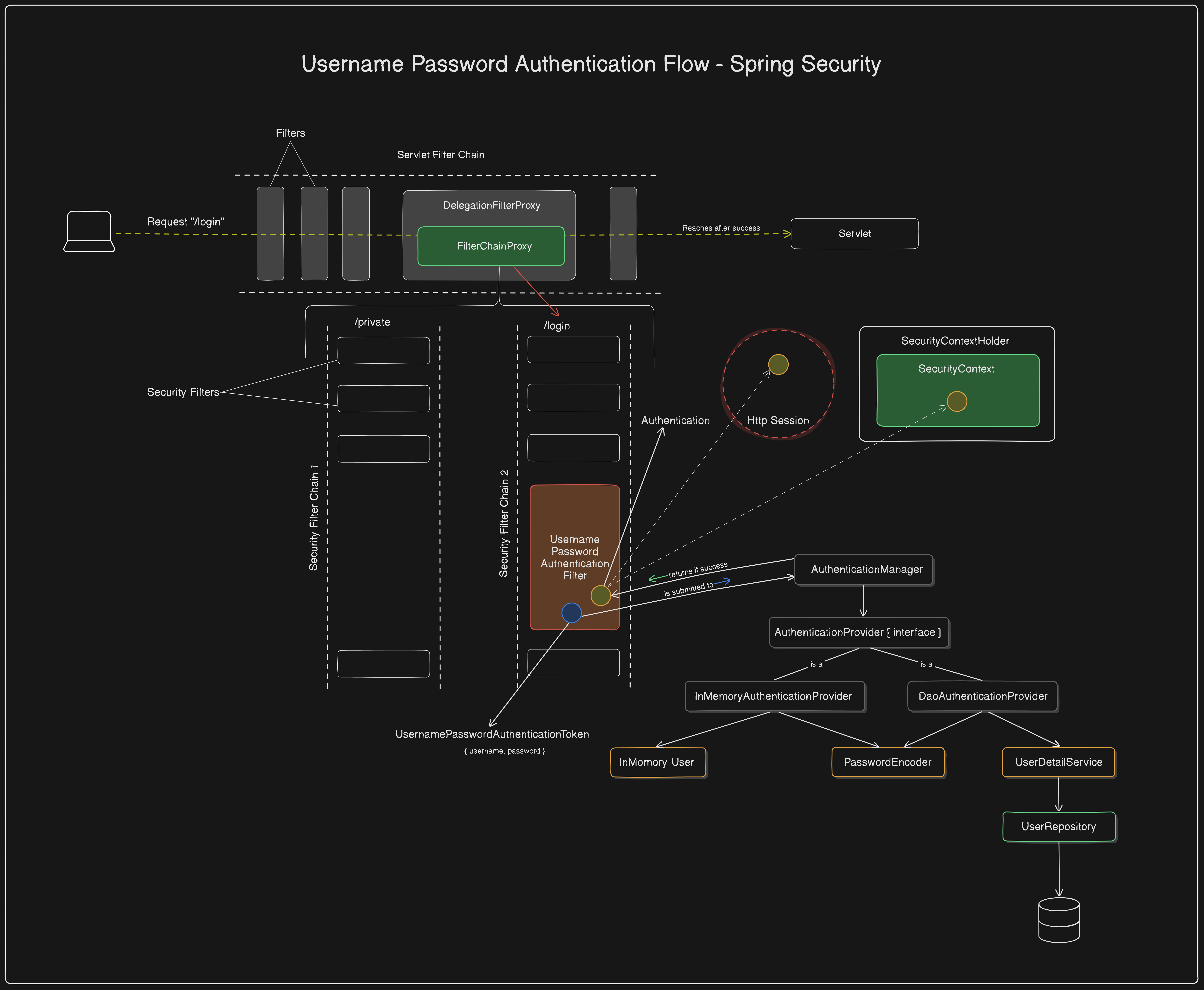
Spring Security adds security to an application during servlet request processing through the FilterChain. It introduces a Proxy Filter called DelegationFilterProxy, which delegates the request from the servlet filter chain to a Spring Bean named FilterChainProxy. The FilterChainProxy manages a list of SecurityFilterChains, each responsible for authenticating and authorizing requests using the necessary methods based on project requirements.
We discussed these components in detail in the previous article of this series, you can take a look at it before continuing with this article if necessary. Here’s the link to it 👉 Key Elements of Spring Security Architecture Explained
In this article, we will focus on how Spring Security authenticates the client requests, what components are involved in the process, and how these components can be used in the future to tweak the implementation as per our requirements.
When is the authentication happening?
Each SecurityFilterChain has two main filters: the SecurityContextPersistenceFilter and the UsernamePasswordAuthenticationFilter. These filters play a key role in request authentication and authorization.
The
SecurityContextPersistenceFilterensures that theSecurityContextis updated, while theUsernamePasswordAuthenticationFilterhandles the authentication of login requests.How do they work exactly? Let's explore them in detail.
The SecurityContextPersistanceFilter
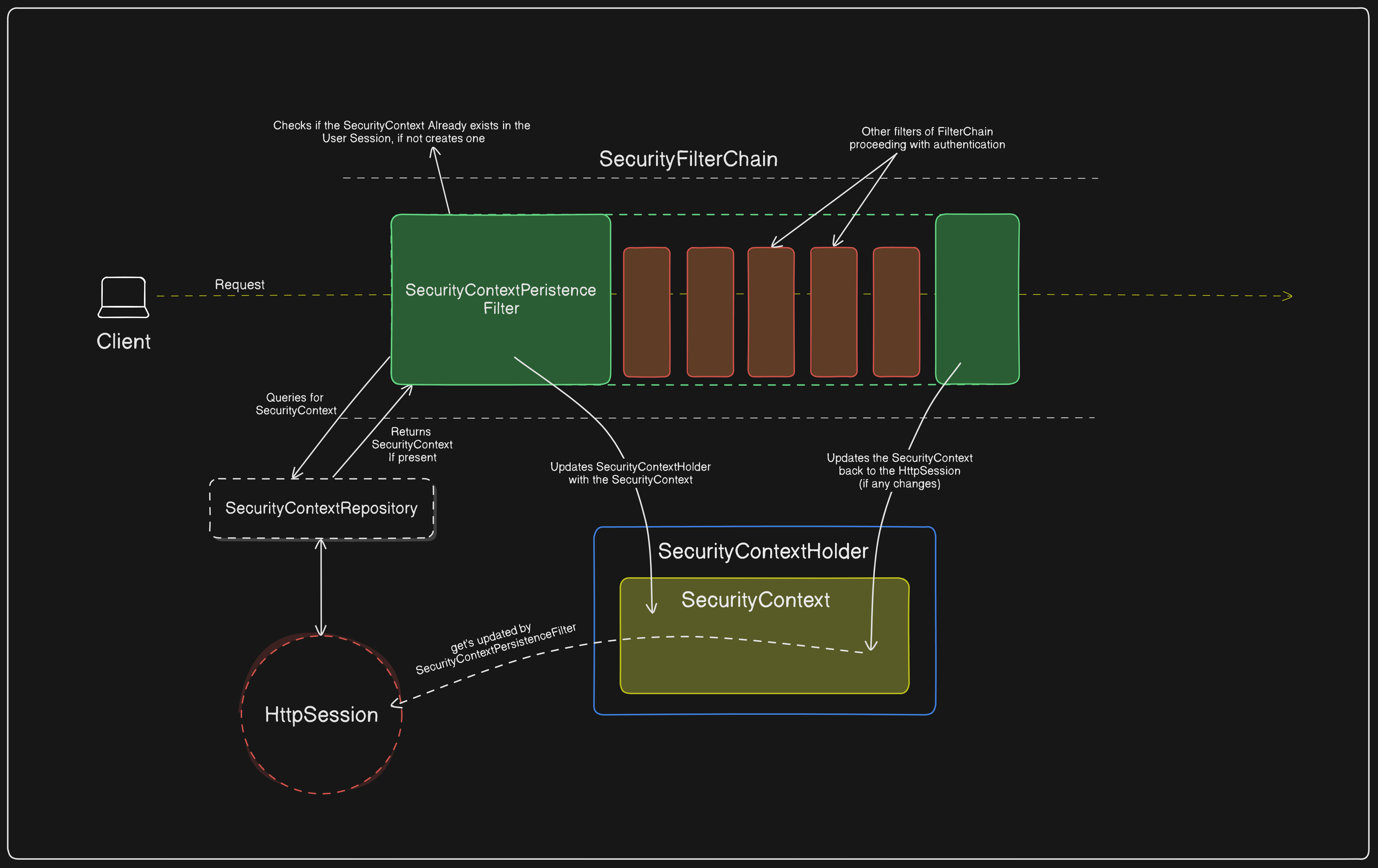
The SecurityContextPersistenceFilter is responsible for persisting the SecurityContext between requests using the SecurityContextRepository. Here is how it works step-by-step.
The request enters the
SecurityContextPersistenceFilter.The
SecurityContextPersistenceFilterusesSecurityContextRepositoryto check if theSecurityContextalready exists in theHttpSession.If the
SecurityContextalready exists, the same will be updated into theSecurityContextHolder,Or else a new
SecurityContextis created and updated both into theSecurityContextHolderand theHttpSession.
- 💡Note: If the
SecurityContextis already present in theHttpSession, it indicates that the user is logged in. This can be verified by checking theisAuthenticatedproperty of theAuthenticationobject within theSecurityContext. Once the
SecurityContextis updated into theSecurityContextHolder, the request is then delegated to other filters in the filter chain.The
SecurityContextPersistenceFilterwraps around the rest of the filters in theSecurityFilterChain, and at the end of theSecurityFilterChainit ensures that if any changes are made to theSecurityContextin theSecurityContextHolder, the same will be updated into theHttpSessionas well.In summary,
The
SecurityContextPersistenceFilterloads theSecurityContextat the start of aSecurityFilterChainand saves any updates back to theHttpSessionafter processing, to maintain the user's authentication state seamlessly.
Take a look at the diagrammatic flow of the working model ofSecurityContextPersistenceFilter.
While the SecurityContextPersistenceFilter ensures the persistence of SecurityContext across requests, it doesn’t significantly contribute to the actual authentication of the request. Rather, the request authentication is majorly carried out by the UsernamePasswordAuthenticationFilter.
The UsernamePasswordAuthenticationFilter
The UsernamePasswordAuthenticationFilter is the main filter responsible for authenticating client requests. This process occurs in several stages and involves many components. Let's break down each stage and the components involved in detail.
The Behaviour
The UsernamePasswordAuthenticationFilter is specially designed to authenticate the requests that are made for the /login endpoint and expects the request body with the contentType as x-www-form-urlencoded. It is specifically designed for login operations. Here is how it operates:
The
UsernamePasswordAuthenticationFilteraccepts the request,Checks if the
SecurityContextalready has anAuthentication. If it does, it verifies whether the authentication status is true or false.If
true✅, the request bypasses theUsernamePasswordAuthenticationFilter—authentication process.If
false❌, then theUsernamePasswordAuthenticationFilterwill proceed with the Authentication using the givenusernameandpassword.
In other words, if the client is considered authenticated, the
UsernamePasswordAuthenticationFilterbypasses further authentication processing.
Let’s Elaborate
Now that we have understood when exactly the Authentication happens, let us understand how the authentication happens.
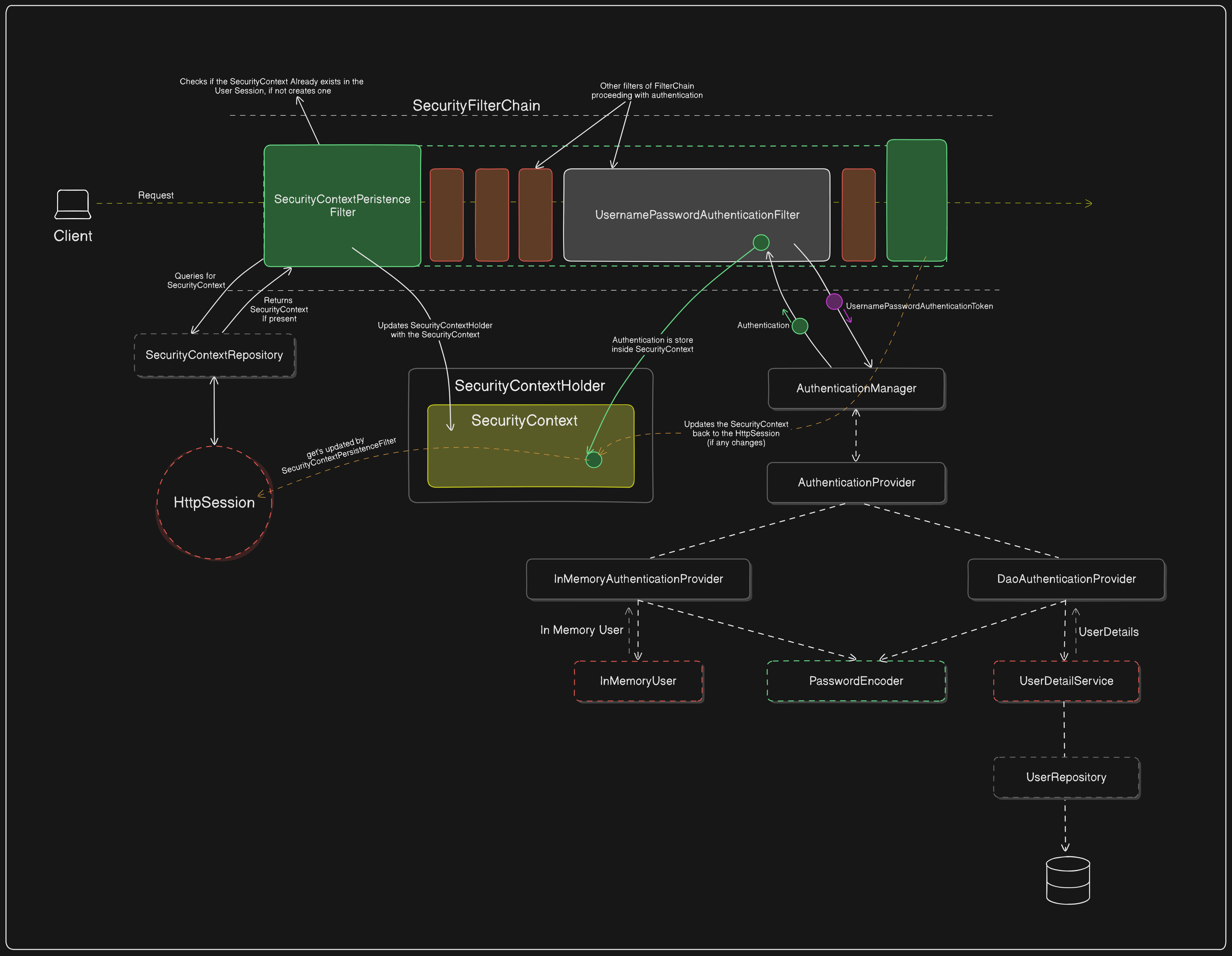
After the UsernamePasswordAuthenticationFilter intercepts a login request and retrieves the username and password from the request parameters, it generates a UsernamePasswordAuthenticationToken using these credentials.
Creates UsernamePasswordAuthenticationToken
The filter creates a UsernamePasswordAuthenticationToken with the username and password.
This token is unauthenticated at this stage, meaning its
isAuthenticatedproperty is set tofalse.
Delegate to AuthenticationManager
The UsernamePasswordAuthenticationFilter passes the UsernamePasswordAuthenticationToken to the AuthenticationManager for authentication.
The AuthenticationManager iterates through available AuthenticationProviders to find a suitable provider for processing the token.
Authentication by AuthenticationProvider
If the AuthenticationProvider can process the UsernamePasswordAuthenticationToken, it attempts to authenticate the user.
Usually, the DaoAuthenticationProvider or InMemoryAuthenticationProvider handles this task.
DaoAuthenticationProvider: Loads user details from a UserDetailsService, often querying a database via the UserRepository.
InMemoryAuthenticationProvider: Matches the provided credentials against a predefined in-memory user list.
Password Verification
The AuthenticationProvider verifies the password using a PasswordEncoder.
If the password matches, the provider creates a new authenticated UsernamePasswordAuthenticationToken with the authenticated user's details and sets its
isAuthenticatedproperty totrue.
Return Authenticated Token
The authenticated UsernamePasswordAuthenticationToken is returned to the AuthenticationManager.
The AuthenticationManager then sends the authenticated token back to the UsernamePasswordAuthenticationFilter.
Store Authentication in SecurityContext
The UsernamePasswordAuthenticationFilter receives the authenticated token and updates the SecurityContextHolder with this new Authentication object.
This ensures that subsequent requests within the same session have access to the authenticated user.
Save the SecurityContext to HttpSession
- If necessary, any changes to the SecurityContext are persisted back to the HttpSession by the SecurityContextPersistenceFilter at the end of the request.
This process ensures that user authentication is seamlessly integrated into the SecurityContext, allowing further requests to be authenticated without requiring re-authentication.
The Overall Flow
Note: The flow diagram skips the representation of SecurityContextPersistenceFilter for simplicity.
Conclusion
In this article, we explored the detailed authentication process in Spring Security, focusing on the role of SecurityContextPersistenceFilter and UsernamePasswordAuthenticationFilter in handling client requests.
The SecurityContextPersistenceFilter ensures that the SecurityContext is correctly loaded and persisted between requests, maintaining the user's authentication state. On the other hand, the UsernamePasswordAuthenticationFilter is responsible for authenticating login requests by generating a UsernamePasswordAuthenticationToken, delegating it to the AuthenticationManager, and updating the SecurityContextHolder with the authenticated token.
Understanding how these filters work together not only helps in grasping the core concepts of Spring Security but also provides the foundation for customizing security behavior in your applications. This knowledge enables developers to effectively tweak and enhance the authentication mechanism based on their project’s requirements. 🚀
Your thoughts and questions are always welcome! Please do like and share! ☺